
Continuum: One System. Everything as Code.
Delivering reproducible, consistent systems with seamless onboarding and zero manual setup
What is Everything as Code?
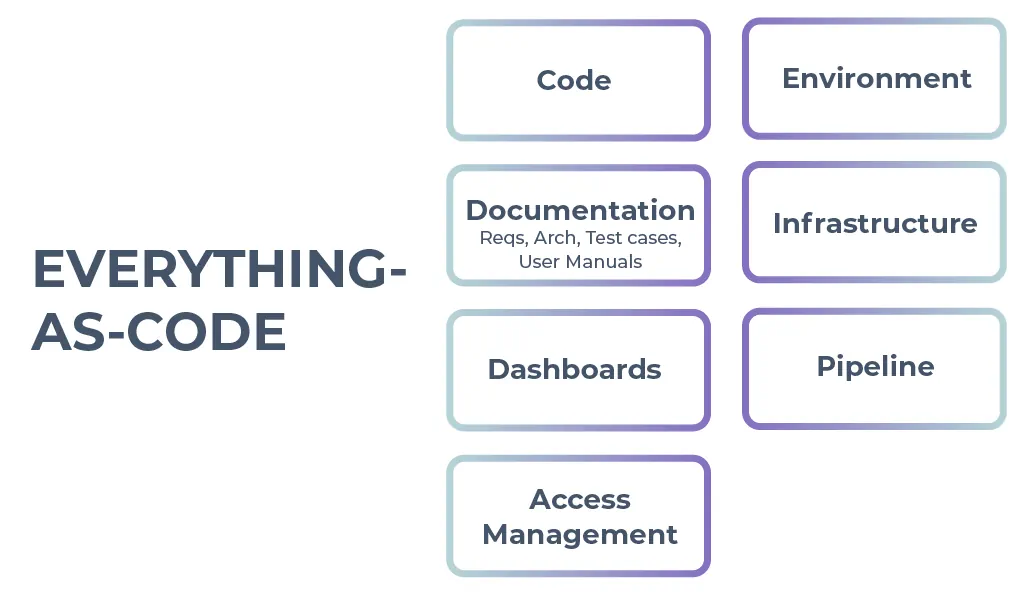
Everything-as-Code, or X-as-Code, is a core Continuum principle where all important project artifacts are described as text-based assets and stored in the repository together with the software. This includes not only source code, but also project setup, CI/CD pipelines, infrastructure, environments, documentation, dashboards, and automation logic.
The idea is simple: if something defines how the project works, it should be stored as code. Every setting and parameter is represented as plain-text files, making project logic:
- version-controlled
- human-readable
- easy to compare with readable diffs
- available for automation
- editable in any IDE or even in a terminal
This gives the project a single technical foundation where code, configuration, documentation, and automation can be handled with the same engineering workflow.
Why Everything as Code?
Traditional engineering environments often grow around manual setup and tool-specific configuration. Pipelines are configured through UI, infrastructure is maintained separately, documentation lives outside the codebase, environments differ between developers, and project knowledge stays hidden in manual procedures or individual experience.
Everything-as-Code solves these problems by keeping project logic close to the code and managing it through the same workflow engineers already use every day: Git, IDEs, code review, CI validation, branching, merging, tagging, and scripts. This makes project changes easier to baseline, fork, synchronize, review, and gate before they affect the main development flow.
In practice, this enables:
- Focus on implementation - repetitive work such as quality checks, testing, release packaging, documentation updates, environment setup, and dashboard generation is automated.
- Easy project switching - unified tools, workflows, and setup conventions reduce ramp-up time when moving between projects.
- Easy baselining - a release captures not only source code, but also the exact documentation, configuration, environment, pipeline, dashboard, and test setup used at that point in time.
- Controlled synchronization - changes in code, documentation, infrastructure, and pipelines can be reviewed and merged through the same workflow.
- Automated change gates - CI can validate whether configuration, documentation, requirements, architecture, and tests remain consistent before changes are merged.
- Safe branching and forking - project variants, experiments, customer-specific setups, or platform-specific configurations can be created without manually duplicating tool configuration
- Reproducible recovery - old project states can be restored from a Git tag, including code base, documentation, environments, pipelines, and related setup.
This makes Continuum scalable: the same principles used to develop software are applied to the full software factory.
Core Principle
“Everything that defines the project must be versioned, reviewable, reproducible, and automatable.”
In practice, this means:
- No hidden configuration - project behavior is not locked inside tool UIs.
- No manual setup dependency - environments and workflows can be regenerated.
- No separate engineering worlds - code, docs, infrastructure, and pipelines are managed together.
- No one-person project knowledge - project logic is visible, documented, and versioned.
- One engineering workspace - developers can work with code, docs, diagrams, configs, and automation from the same IDE
What is stored as code?
In Continuum, Everything-as-Code covers the main parts of the software factory:
- Project Setup as Code - project structure, repositories, components, platforms, development stages, and test stages
- Pipelines as Code - CI/CD workflows, quality gates, validation stages, and release automation
- Infrastructure as Code - server setup, provisioning, monitoring infrastructure, and tool configuration
- Environment as Code - reproducible development, test, CI, and sandbox environments
- Documentation as Code - requirements, architecture, tests, diagrams, traceability, and generated reports
- Metrics and Dashboards as Code - KPI definitions, dashboard generation, coverage views, and project health reporting
- User and Access Management as Code
Project Setup as Code
Project setup is defined through a structured, versioned project description that becomes the primary engineering artifact for initializing the Continuum environment. An engineer captures project needs through a questionnaire with development and QA teams and translates them into a code-based project definition.
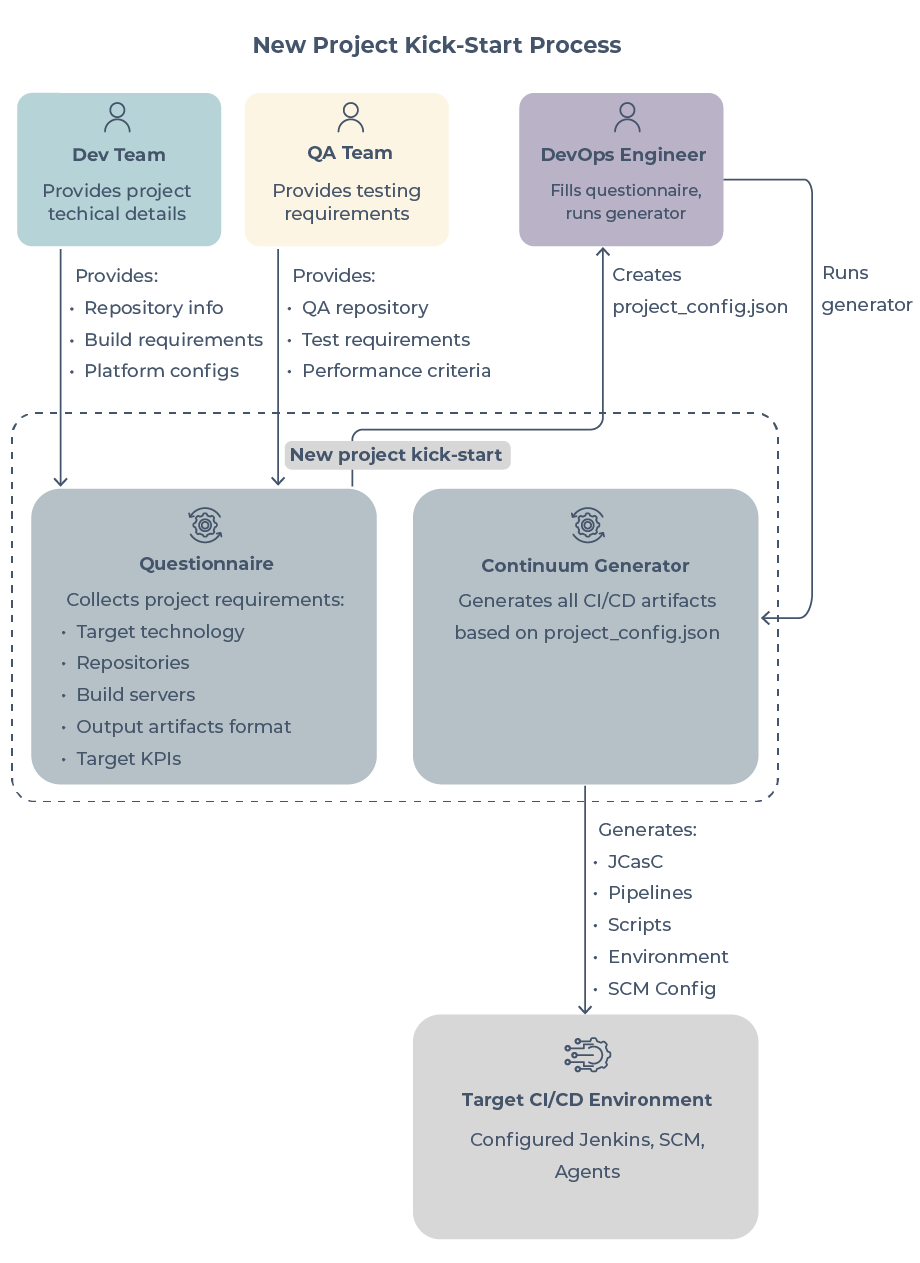
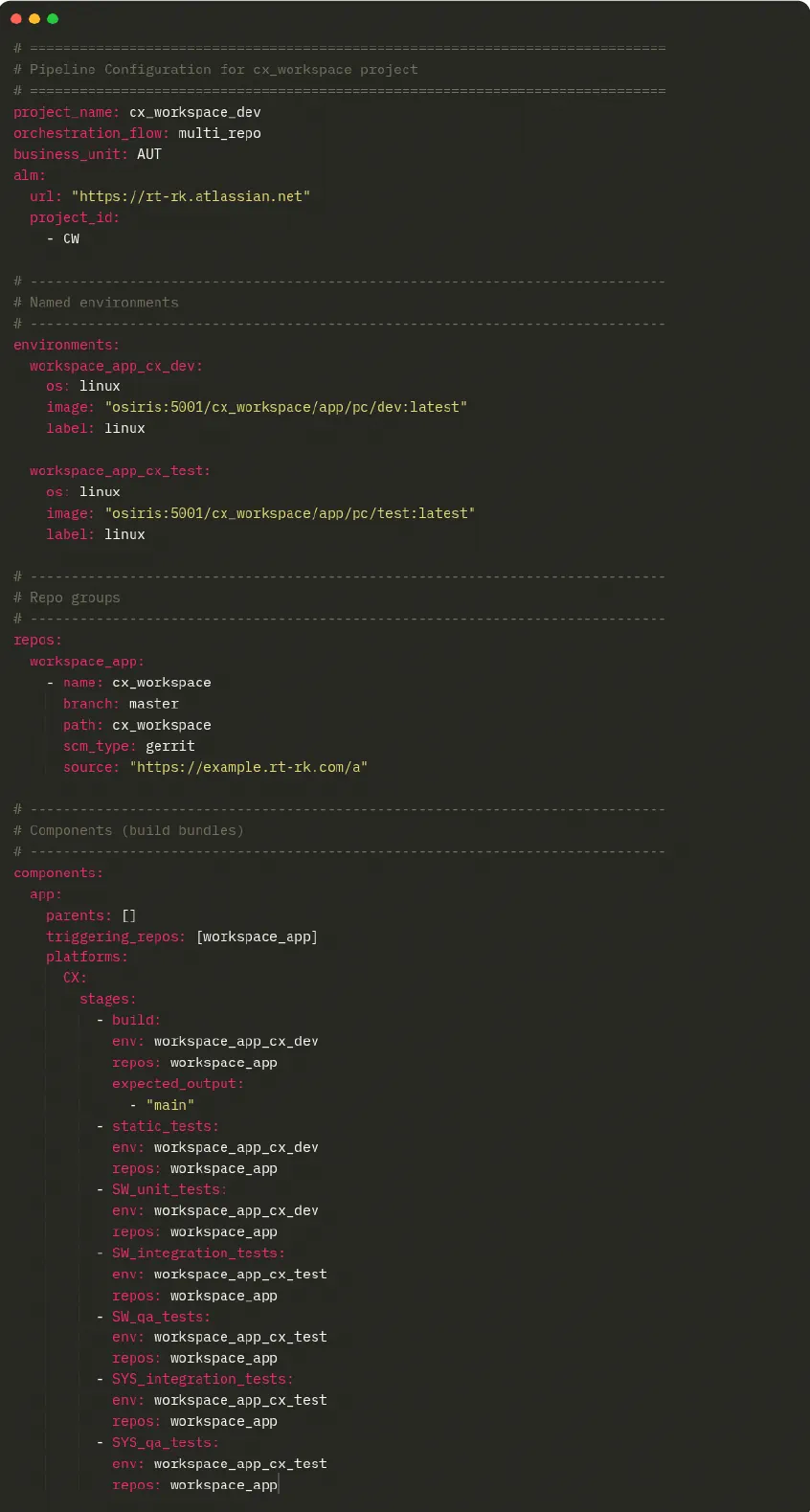
The project description configuration file defines:
- Organizational environment, such as task tracker, knowledge base, and related project tools
- Repositories and source-code management structure
- Development and test environments
- Multi-level component structure
- Supported platforms and deployment targets
- Development and testing stages
Example of such could be seen below.
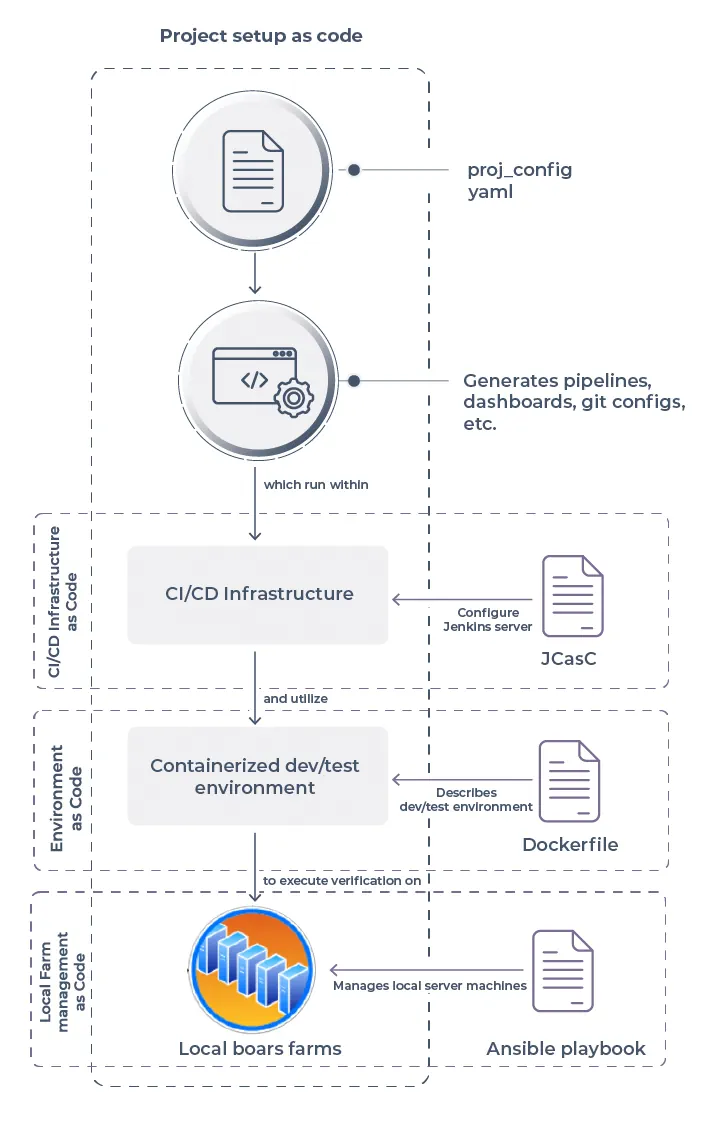
This creates a single reproducible source of truth for the entire engineering workflow. The Continuum Generator is then run based on this project description and produces the complete set of scripts and configurations required to start development immediately, including:
- CI/CD infrastructure (e.g. Jenkins Configuration as Code)
- Source-code management configuration (e.g. Git\Gerrit\Bitbucket server setup)
- Template for containerized development and test environments (e.g. Dockerfiles, Vagrantfiles)
- Local server farm and infrastructure automation (e.g. Ansible playbooks)
- Metrics and KPI visualization (e.g. Grafana dashboards)
- Automated user-management configuration (e.g. AD/SAML)
What this enables:
- Project setup reduced from weeks to minutes
- One reproducible source of truth for the engineering workflow
- Consistent setup across projects and teams
- No hidden manual infrastructure configuration
- Fast regeneration or update of project setup from versioned definitions
Pipelines as Code
Pipelines as Code means that build, validation, test, documentation, release, and deployment workflows are defined as version-controlled configuration instead of being manually configured through CI tool UI. Pipeline logic becomes part of the project setup and can be reviewed, updated, regenerated, and restored like any other engineering artifact.
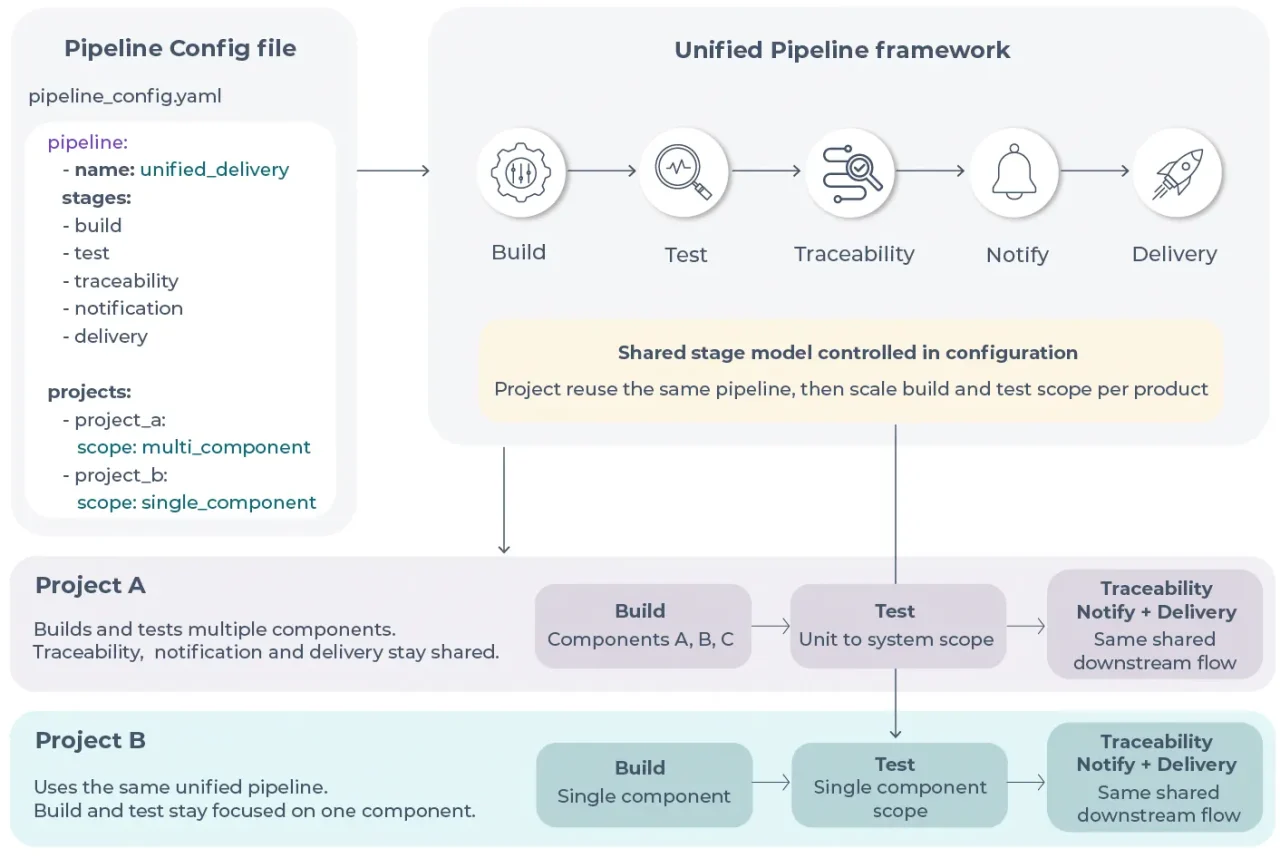
The pipeline definition includes:
- CI/CD workflow structure
- Pull-request validation stages
- Build and test execution steps
- Quality gates and merge conditions
- Release packaging and deployment stages
- Documentation generation and publishing flow.
This creates a reproducible CI/CD setup where pipeline behaviour is explicit and consistent across projects.
What this enables:
- CI/CD setup managed through Git
- Pipeline changes reviewed like code
- Consistent quality gates across projects
- Easier recovery or migration of CI infrastructure
- No hidden manual Jenkins or CI configuration
Pipelines template example
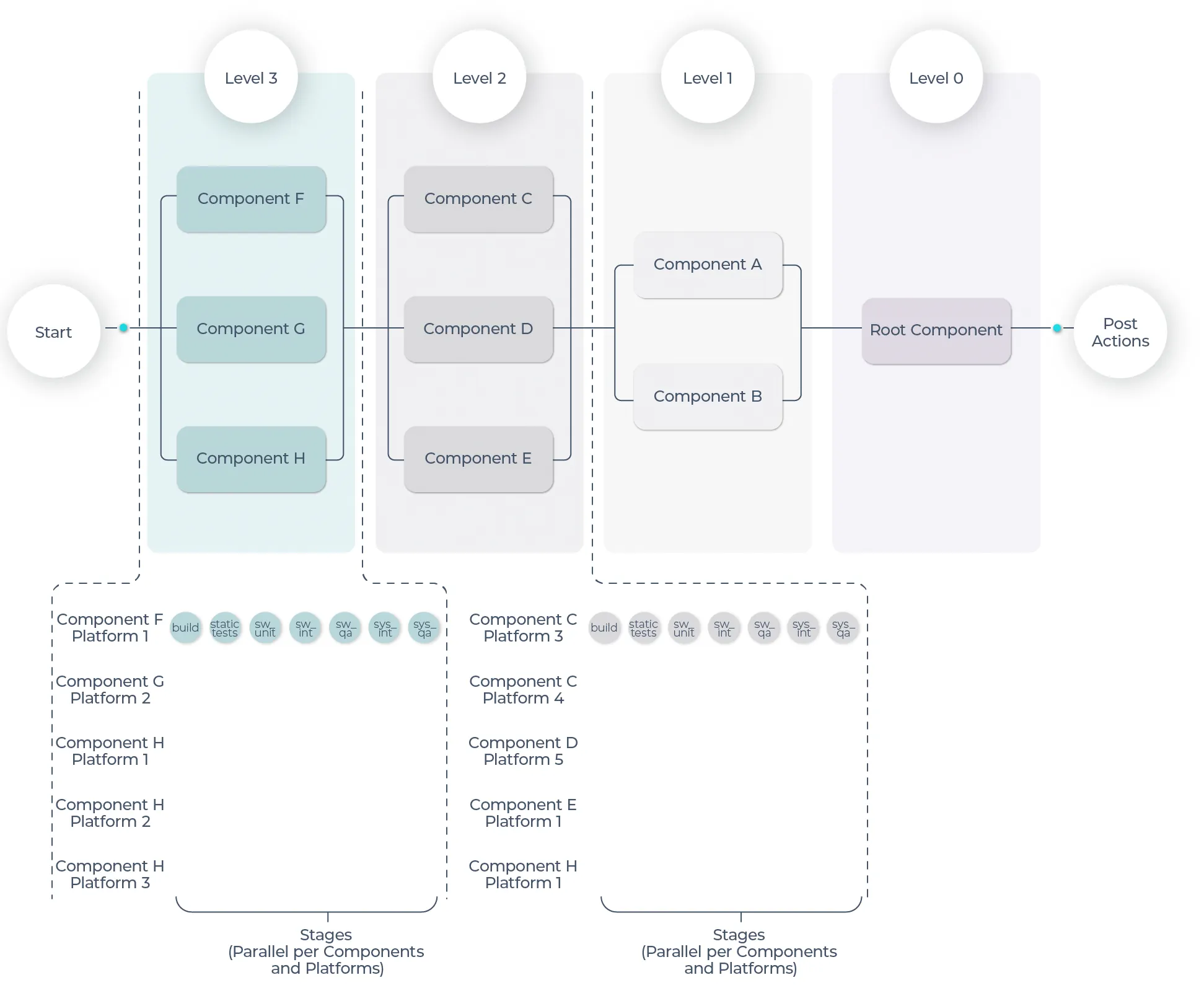
Continuum Wizard generates Jenkins configuration file from project configuration file
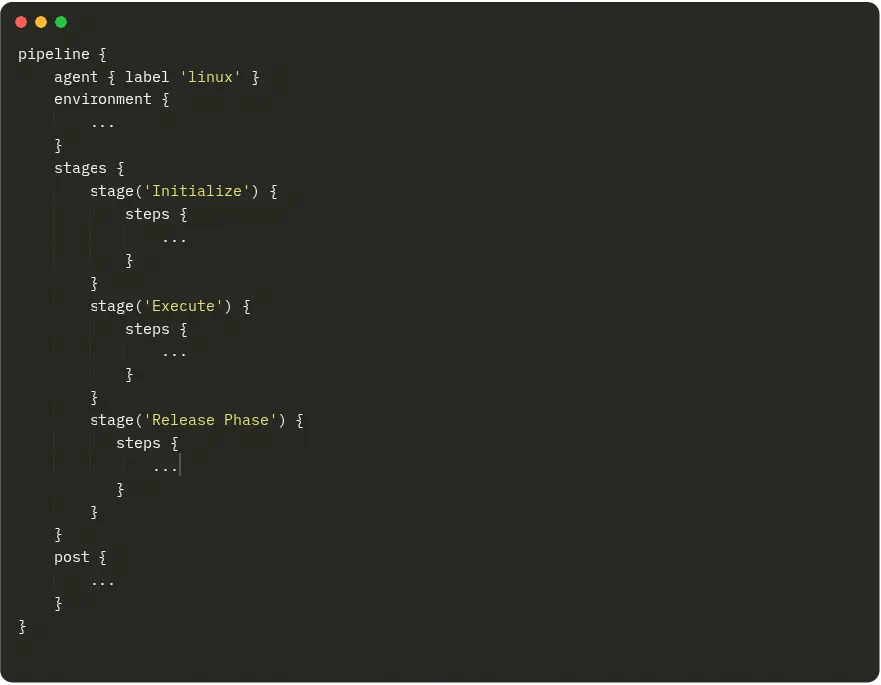
Which is afterwards interpreted as pipeline bellow

Infrastructure as Code
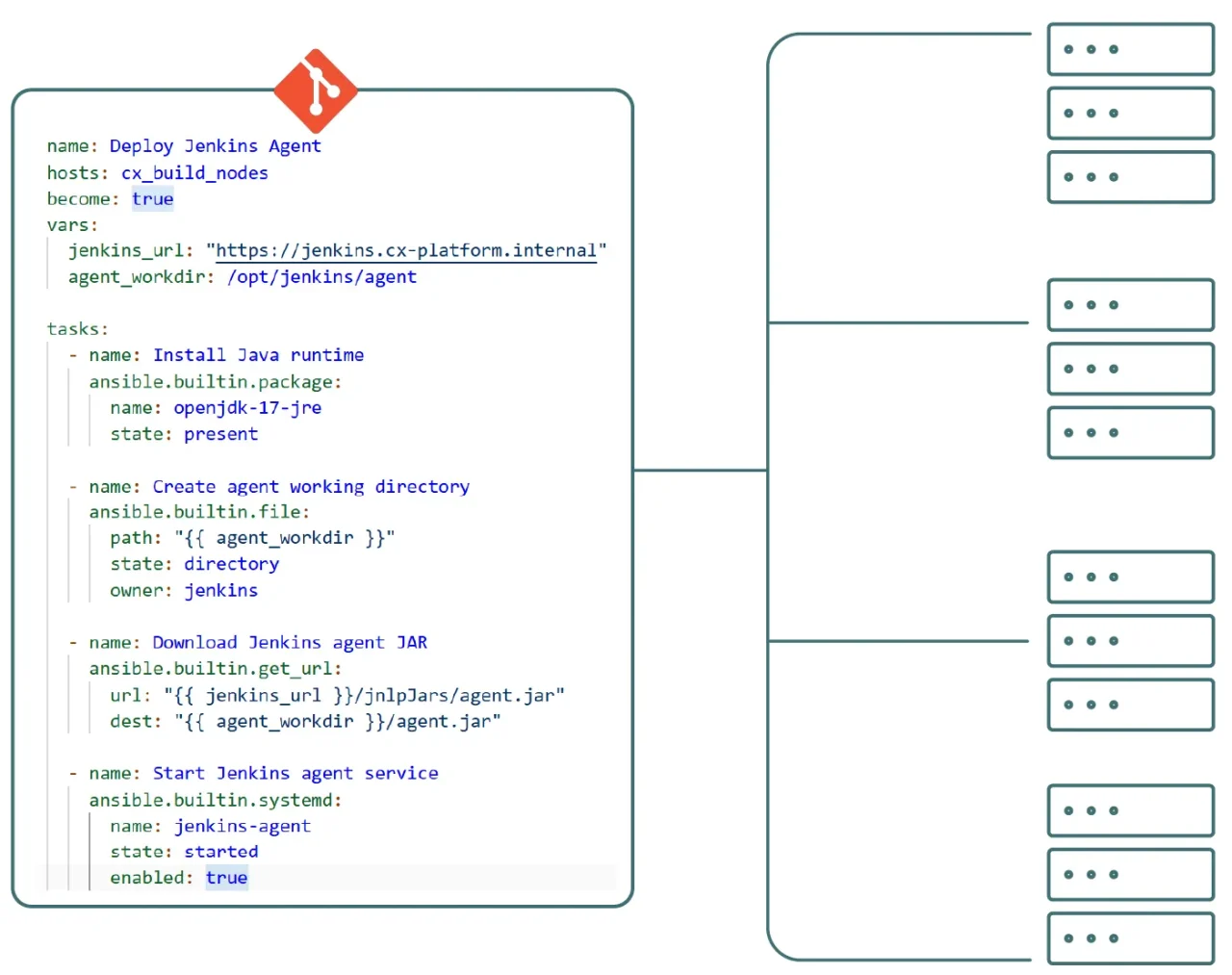
Infrastructure as Code defines the servers, services, and tool infrastructure required by the project through version-controlled configuration and automation scripts. Instead of manually preparing machines or tool installations, infrastructure setup is described as code and can be applied repeatedly.
The infrastructure definition includes:
- CI server setup
- SCM/Git server configuration
- Local server farm configuration
- Monitoring services
- Tool deployment and configuration
- Infrastructure provisioning logic
This creates a reproducible infrastructure baseline for the project. In Continuum, infrastructure automation can be generated and applied through mechanisms such as Ansible playbooks.
What this enables:
- Repeatable infrastructure provisioning
- Reduced environment drift
- Safer infrastructure updates
- Easier reconstruction of project infrastructure
- Consistent engineering services across teams
Environment as Code
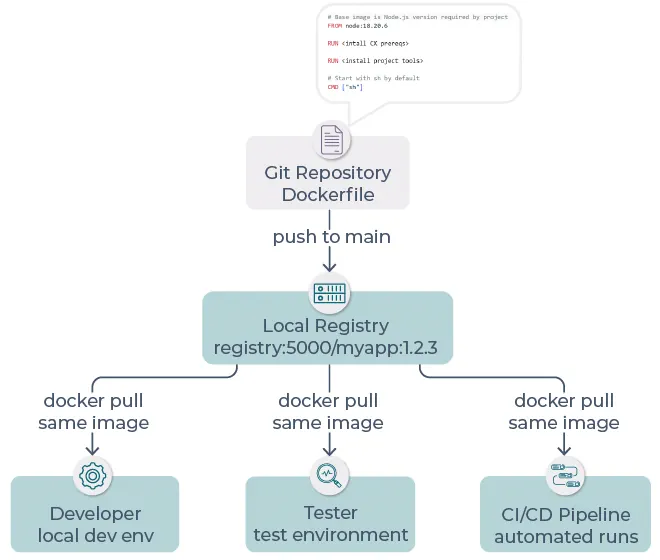
Environment as Code defines development, test, CI, and sandbox environments as reproducible configuration. Tool versions, runtime dependencies, containers, and test execution environments are stored as code so the same setup can be recreated locally or in CI.
The environment definition includes:
- Development environment setup
- Test environment setup
- Container definitions
- Required tools and dependencies
- Runtime configuration
- Local sandbox configuration
This creates a consistent execution environment for developers, CI pipelines, and test infrastructure. In Continuum, containerized environments can be generated through Dockerfiles, and project sandboxes can mirror services such as Jenkins, Git, monitoring, project repositories, and orchestration components.
What this enables:
- Elimination of “works on my machine” issues
- Faster developer onboarding
- Reproducible local and CI execution
- Safe experimentation before production changes
- Consistent toolchain across the project
Documentation as Code
Documentation as Code means that engineering documentation is stored close to the source code and managed through the same Git-based workflow. In Continuum, documentation is not limited to user guides; it includes requirements, architecture, test cases, diagrams, traceability data, generated reports, and project status information.
The documentation definition includes:
- Customer and high-level requirements
- Decomposed software requirements
- Architecture descriptions and diagrams
- Test specifications for different test levels
- Traceability between requirements, architecture, implementation, and tests
- Generated reports such as coverage, status, and implementation tracking
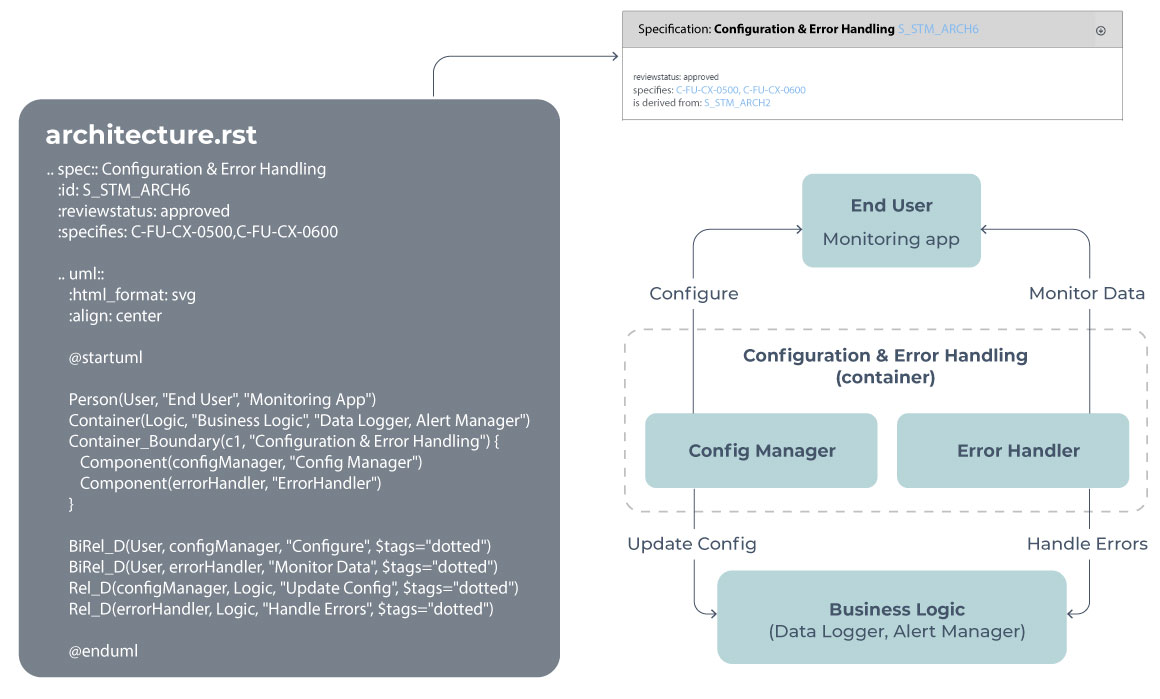
Continuum documentation is structured around the arc42 architecture template and processed through the Sphinx documentation framework. The engineering artifact model is based on Sphinx-Needs, where requirements, architecture specifications, test cases, test results, releases, and platforms are represented as typed objects with IDs, metadata, and relations. Architecture diagrams are maintained as text-based PlantUML files and organized using the C4 model where applicable.
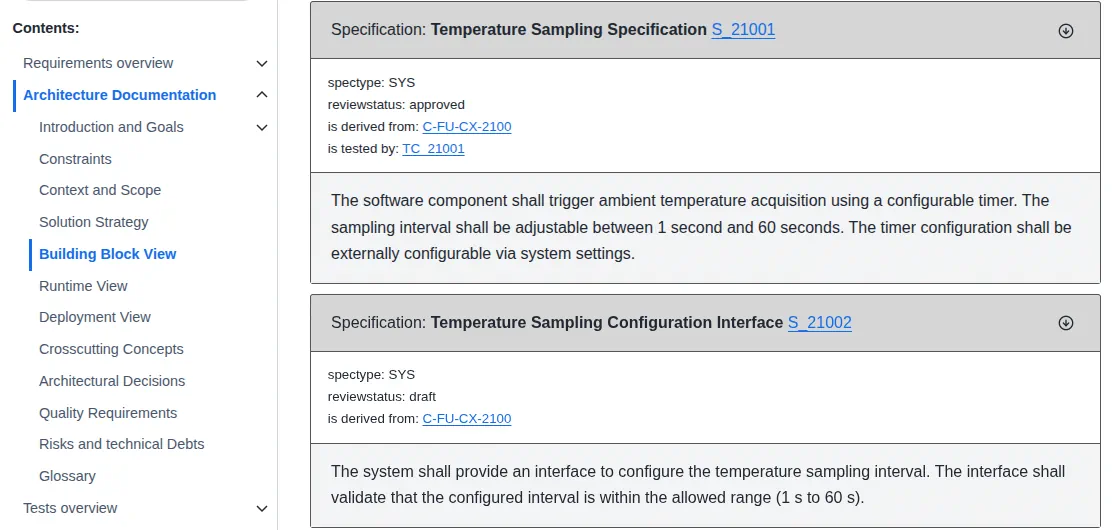
This creates a seamless integration between the “documentation world” and the “development world”. Engineers can update requirements, architecture, diagrams, test cases, implementation links, and source code from the same IDE, review them in the same pull request, validate them in the same CI workflow, and baseline them in the same Git revision.
Documentation content is written in text-based formats such as .rst, .puml, and structured data files, while the output can be generated as HTML, PDF, Confluence pages, or exported to formats such as ReqIF, JSON, CSV, and other exchange formats for synchronization with ALM tools, test frameworks, dashboards, and reporting systems. Documentation therefore follows a build process similar to source code: CI jobs can generate the latest documentation, synchronize requirements and test results with external systems, calculate coverage and KPI metrics, and publish always up-to-date project status views
What this enables:
- Current documentation view of system purpose, implementation status, progress, coverage, and traceability
- Documentation kept close to code, typically in component-level /docs next to /code
- Same IDE, Git workflow, review process, and CI validation for documentation and source code
- Automated generation of HTML/PDF outputs, traceability views, reports, and status pages
- Synchronization with ALM tools, test frameworks, databases, dashboards, and reporting systems
- Reproducible project state from every Git revision for baselining and long-term maintenance
More details on documentation model itself and project traceability can be found here.
Metrics and Dashboards as Code
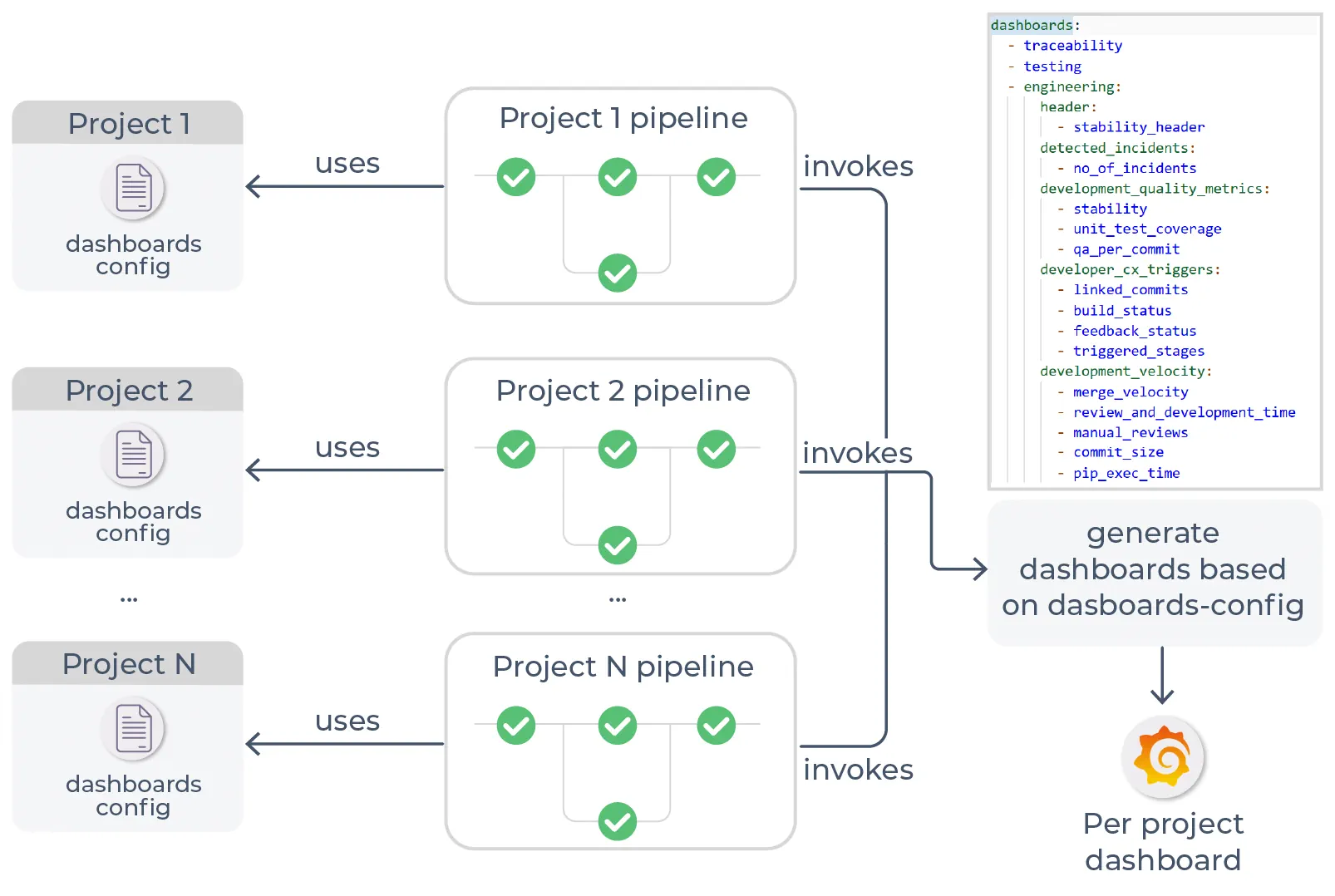
Metrics and Dashboards as Code means that project reporting is defined through version-controlled configuration and documentation artifacts, instead of being manually assembled in reporting tools. In Continuum, Grafana dashboards are stored as code, while the structured tables used for KPI collection are defined directly in .rst documentation files. This makes both the dashboard layout and the KPI data model reviewable, reproducible, and synchronized with the project lifecycle.
The dashboard definition includes:
- Grafana dashboard definitions stored as code
- .rst tables defining KPI sources and reporting structure
- Requirement coverage and traceability tables
- Test coverage and pass-rate tables
- Release readiness and milestone status views
- Project health indicators derived from CI, test results, and documentation data
The KPI collection model is therefore part of the same Doc-as-Code workflow as requirements, architecture, tests, and traceability. Tables in documentation define how metrics are grouped, filtered, and presented, while Grafana dashboards visualize the calculated results. This allows project reporting to be generated from live engineering data instead of manually prepared status reports.
What this enables:
- Version-controlled Grafana dashboards and KPI definitions
- KPI tables maintained together with project documentation
- Live reporting from requirements, tests, CI results, and traceability data
- Consistent project-health views across teams and releases
- Reproducible dashboards and reports from every Git revision
- Reduced manual effort in status reporting and KPI preparation
More details on types of available dashboards and their visualization is available here.
User and Access Management as Code
User and Access Management as Code defines project roles, permissions, and identity integration through version-controlled configuration instead of manual administration in each tool. Access rules become part of the reproducible project setup.
The access-management definition includes:
- User roles
- Project permissions
- Tool access rules
- Identity-provider integration
- Automated onboarding configuration
- AD/SAML setup where applicable
This creates consistent access control across the Continuum environment and reduces manual administration when projects are initialized, updated, or restored.
What this enables:
- Faster onboarding and offboarding
- Consistent permissions across tools
- Reduced manual administration
- Repeatable access setup
- Better control of project security boundaries
Project Reproducibility and Hermeticity
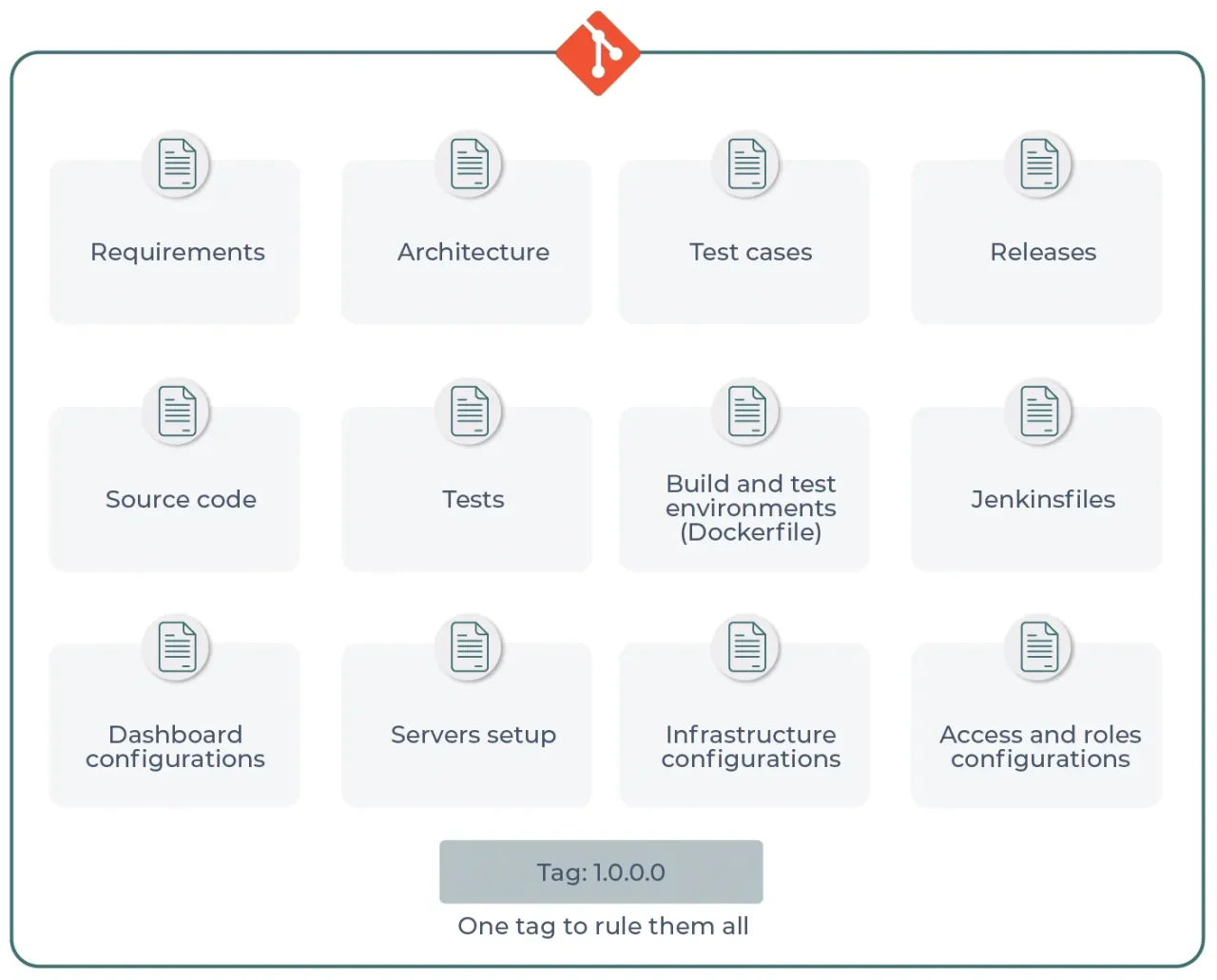
One of the key values of Everything-as-Code is that a project can be restored as a complete engineering state, not only as source code. Since requirements, architecture, documentation, test specifications, test results, configuration, environments, pipelines, dashboards, and infrastructure definitions are stored under version control, a Git revision becomes a full project baseline.
This means that restoring an old release is no longer limited to checking out old source files. By rolling back to a Git tag, the team can recover the complete description of that project version. Continuum extends the familiar git checkout
This provides:
- Reliable release reconstruction from a known Git state
- Easier forensic analysis when defects appear in older versions
- Stable baselines for audits, maintenance, and long-lifecycle projects
- Reduced dependency on manual setup knowledge or outdated tool configuration
- Confidence that the project can be restored, rebuilt, analyzed, and continued later
AI Assistance enablement
Everything-as-Code makes the project AI-ready because project knowledge is stored as structured, text-based, version-controlled content. Requirements, architecture, tests, configuration, documentation, traceability links, dashboards, and results are not hidden in isolated tools or binary formats; they are available as files that can be indexed, searched, retrieved, and analyzed.
An engineer can describe a desired change in free form, and AI can use the retrieved project context to generate new content, review proposed updates, check consistency across requirements, architecture, tests, and configuration, identify impacted artifacts, and suggest changes aligned with the existing project baseline.
This enables:
- Impact analysis from real project context
- Requirements and documentation drafting
- Architecture update suggestions
- Test-case generation
- Configuration and consistency checks
- Test-result and project-status analysis
This is also a prerequisite for Spec-Driven Development: specifications become structured, versioned engineering inputs that AI and automation can use to derive implementation tasks, tests, validation gates, and reporting views.
Key benefits of Everything as Code
Everything-as-Code turns the complete engineering environment into a versioned and reproducible system.
It enables:
- Reproducibility - any project state can be restored from a Git revision.
- Consistency - all developers, CI systems, and environments use the same definitions.
- Editability - project logic can be changed in an IDE or terminal.
- Reviewability - configuration changes are reviewed like source code.
- Automation - repetitive setup, validation, reporting, and release activities can be scripted.
- Single-tool workflow - code, documentation, diagrams, infrastructure, and pipelines can be handled from the same engineering environment.
- Scalability - project setup and updates can be applied consistently across multiple projects and teams.
- Long-term maintainability - even after years of development, the project can be reconstructed from version-controlled artifacts.