

Introduction
Displays in the automotive industry face increasing demands for clarity, performance, and cost-efficiency. This article provides an overview of the CYT3DL family of TRAVEO™ T2G microcontroller units (MCU), focusing on their capabilities for automotive display applications such as instrument clusters and Head-Up Displays (HUD).
We then introduce the graphics driver designed for these MCUs, which enables efficient use of the integrated hardware graphics engines and simplifies application development. Building on this foundation, we turn to the concept of warping, a key feature for HUD systems where optical distortions must be corrected to ensure image clarity and stability.
Different warping modes - sample points, delta vectors, and delta vector increments—are discussed, highlighting their respective strengths and limitations. Finally, we share measurement results obtained on the TRAVEO evaluation board, demonstrating how the size of the warping table directly influences processing performance and system efficiency.
About the TRAVEO II board
The CYT3DL family of TRAVEO™ T2G automotive microcontrollers is designed for applications such as instrument clusters and HUDs. Built on a 40-nm process, these MCUs integrate an Arm® Cortex®-M7 (240 MHz) for primary processing and an Arm® Cortex®-M0+ (100 MHz) for peripheral and security tasks. They also feature a rich set of automotive communication interfaces including CAN FD, LIN, CXPI, and Ethernet.
A standout feature is the advanced graphics subsystem, supporting 2D/2.5D rendering, perspective warping, and HUD-specific display effects, powered by 2 MB of embedded VRAM. It enables flexible input and output options such as parallel RGB, FPD-Link, and MIPI CSI-2, with resolutions up to 2880×1080, as well as real-time video capture, composition, and warping.
The devices also feature 4 MB of flash with Read-While-Write capability, 384 KB of SRAM, multiple DMA controllers, and integrated hardware for secure, high-performance automotive graphics and computing platforms.
Graphics driver
The Graphics Driver for TRAVEO™ T2G cluster MCUs is a software layer that helps developers make efficient use of the built-in graphics hardware. It provides an abstraction of the hardware units such as:
- the Blit Engine for pixel operations,
- the Drawing Engine for vector graphics,
- the Composition and Display Engines for managing layers and timing, and
- the Capture Engine for handling video input.
The driver is structured around displays, windows, and surfaces as central objects, allowing flexible scene composition. It includes APIs for blending, warping, rendering text, and image transformations. Synchronization features ensure smooth updates using double buffering or common commit modes.
Additional features include direct video capture to display, real-time warping for HUD applications, and integration with safety display drivers. Memory management is optimized across VRAM, system RAM, and external memory. Tutorials and reference examples are provided to simplify application development.
In short, the graphics driver provides a high-level programming interface that leverages TRAVEO™ T2G’s powerful graphics subsystem to enable fast, secure (ASIL-compliant), and flexible rendering for automotive displays.
Warping
Warping on TRAVEO™ T2G microcontrollers is primarily designed for HUD systems, where optical distortion must be corrected to ensure that projected images appear stable and readable to the driver. The mechanism relies on a warping map, which remaps original pixel coordinates to corrected positions so that geometric distortions introduced by the windshield or projection angle are compensated.
In normal mode, the system fetches a precomputed coordinate buffer from flash memory, enabling real-time distortion correction during display rendering. In calibration mode, this buffer is transferred to VRAM, allowing the CPU to dynamically update grid nodes that define the distortion characteristics. A double-buffering scheme ensures visual integrity: while the warping engine reads one buffer, the CPU updates the other.
Calibration is based on distortion grid nodes that represent deformation points across the display surface. Users can adjust these points interactively, and the system generates a continuous warping map using spline interpolation. To optimize performance and memory usage, the resulting map is compressed into a delta vector increment mode coordinate buffer, significantly reducing VRAM requirements.
This approach enables on-the-fly warping, meaning the correction is applied directly in the display pipeline without requiring full frame buffers. The result is a highly efficient solution that adapts to varying driver seating positions or viewing angles, ensuring HUD projections remain correctly aligned and distortion-free under different driving conditions.
Warping Modes: Advantages and Disadvantages
The warping engine supports three operational modes for managing the coordinate buffer:
Sample Points Mode
- Description: The buffer contains the absolute target coordinates for each pixel.
- Advantage: Highest precision, since every pixel is mapped explicitly.
- Disadvantage: Extremely large memory requirements, making it impractical for HUD resolutions.
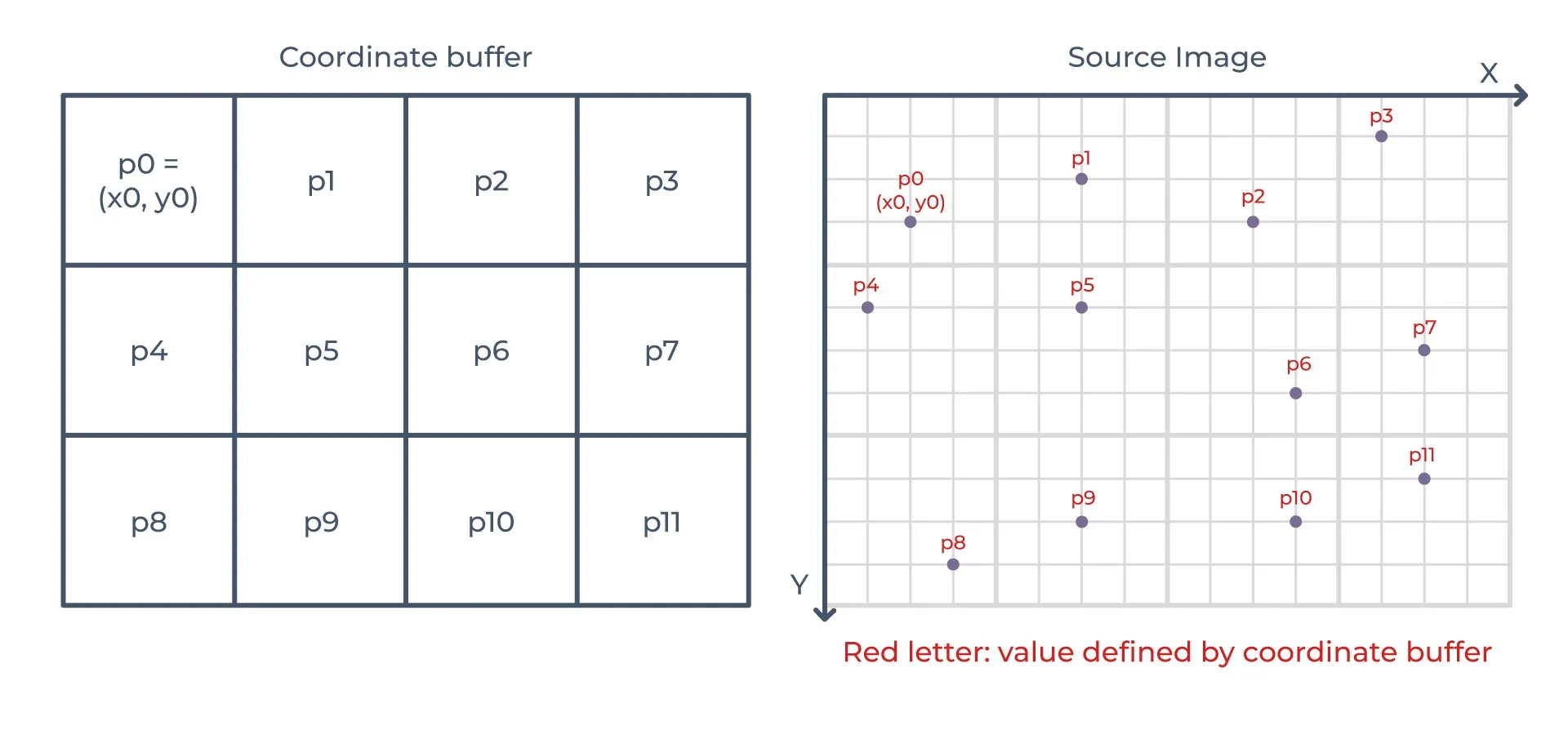
Figure 1. Sample Points Mode
Delta Vectors Mode
- Description: The buffer contains relative displacement vectors between neighboring pixels.
- Advantage: Significant memory savings, as differences between adjacent pixels can be compactly encoded.
- Disadvantage: Requires sequential processing, since each pixel’s position depends on the previous one. Random access becomes less efficient.
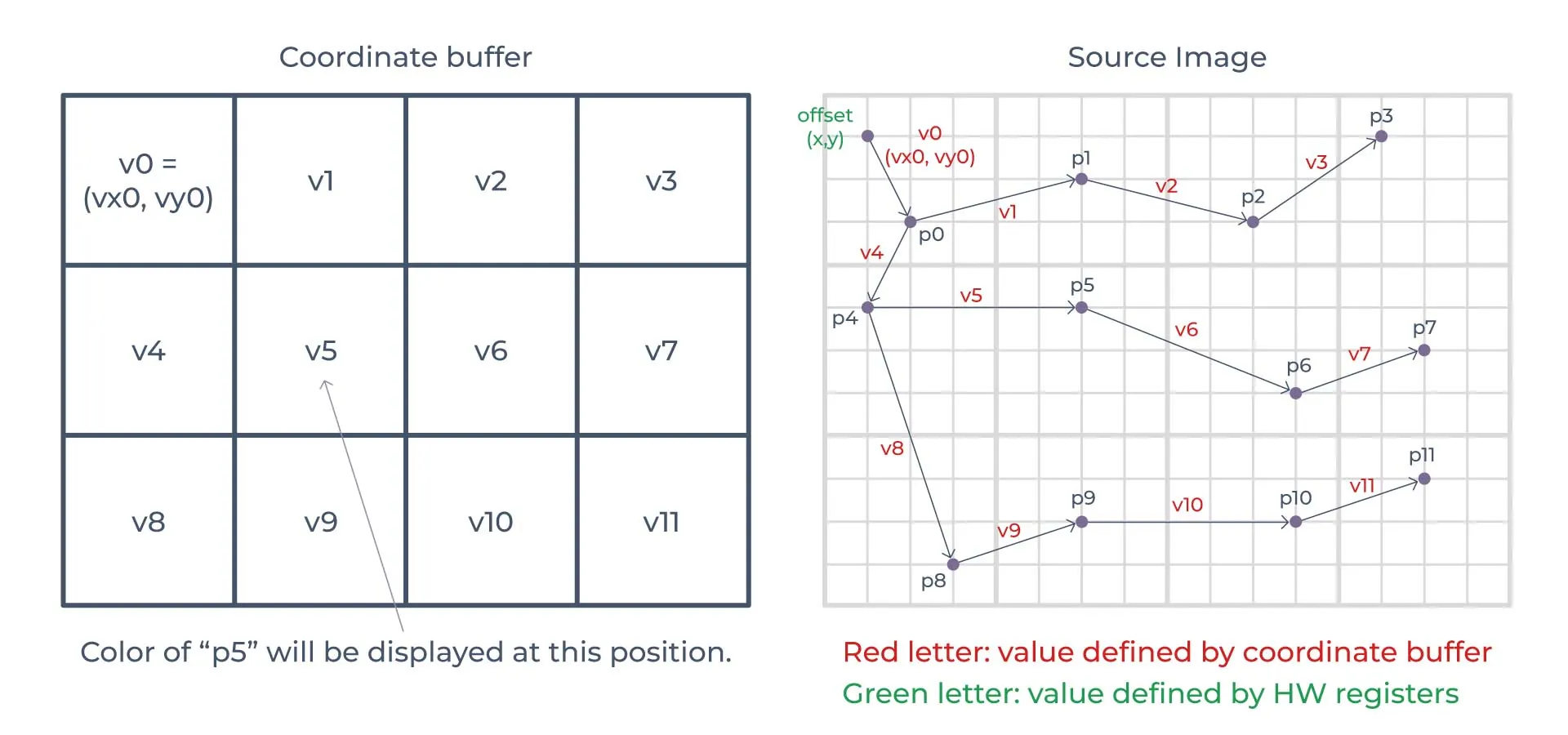
Figure 2. Delta Vectors Mode
Delta Vector Increments Mode
- Description: An optimized version of delta vectors, where only the incremental changes in displacement are stored (e.g., per line).
- Advantage: Best trade-off between precision and memory usage. Data can be represented with only 8 bits (4 for X, 4 for Y), drastically reducing VRAM needs.
- Disadvantage: Lower precision than sample points mode. Extreme distortions may introduce approximation errors.
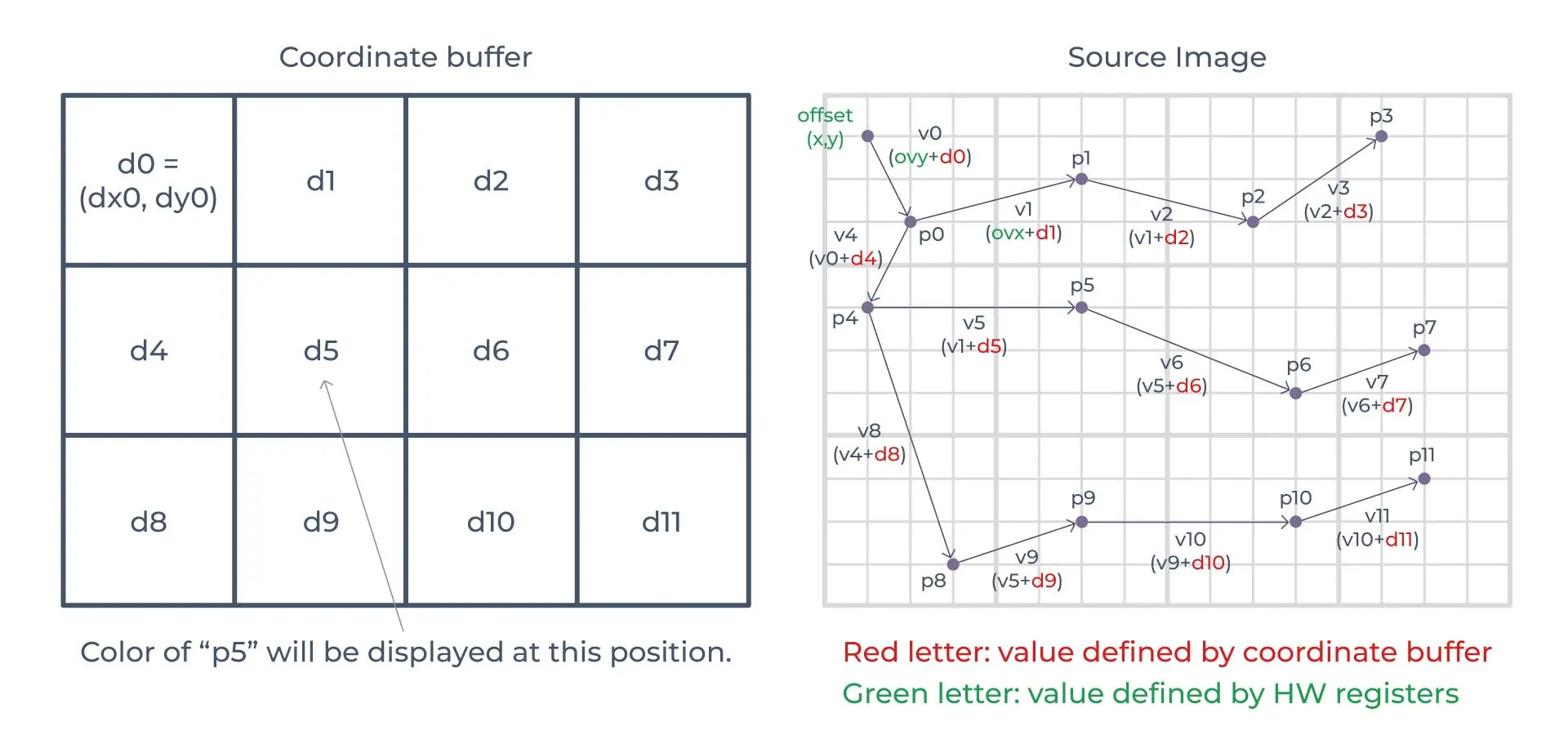
Figure 3. Delta Vector Increments Mode
Summary: Sample points mode delivers maximum precision but consumes excessive memory. Delta vectors reduce memory but require sequential processing. Delta vector increments strike the best balance and are the most practical for real-time HUD applications. Table 1 summarizes the three warping modes highlighting their advantages, disadvantages, and typical memory impact (example usage is 1920×720) in automotive HUD scenarios.
| Mode | Advantage | Disadvantage | Typical VRAM usage |
|---|---|---|---|
| Sample Points | Highest precision (per-pixel mapping) | Extremely high memory use, impractical at high resolutions | ~Several 100 MB |
| Delta Vectors | Compact storage, saves significant memory | Sequential processing required, random access less efficient | ~Tens of MB |
| Delta Vector Increments | Best trade-off: efficient, 8-bit representation (4 bits X + 4 bits Y) | Limited precision, possible errors under extreme distortion | ~Few MB |
Table 1. Operational modes
Measured Performance on the TRAVEO board
Measurements were carried out on the TRAVEO™ T2G board under different coordinate buffer configurations, focusing on sample points mode for maximum precision. The experiments varied both the input image size (2×2 to 500×500) and the warping coordinate buffer (1000×1000 down to 100×100).
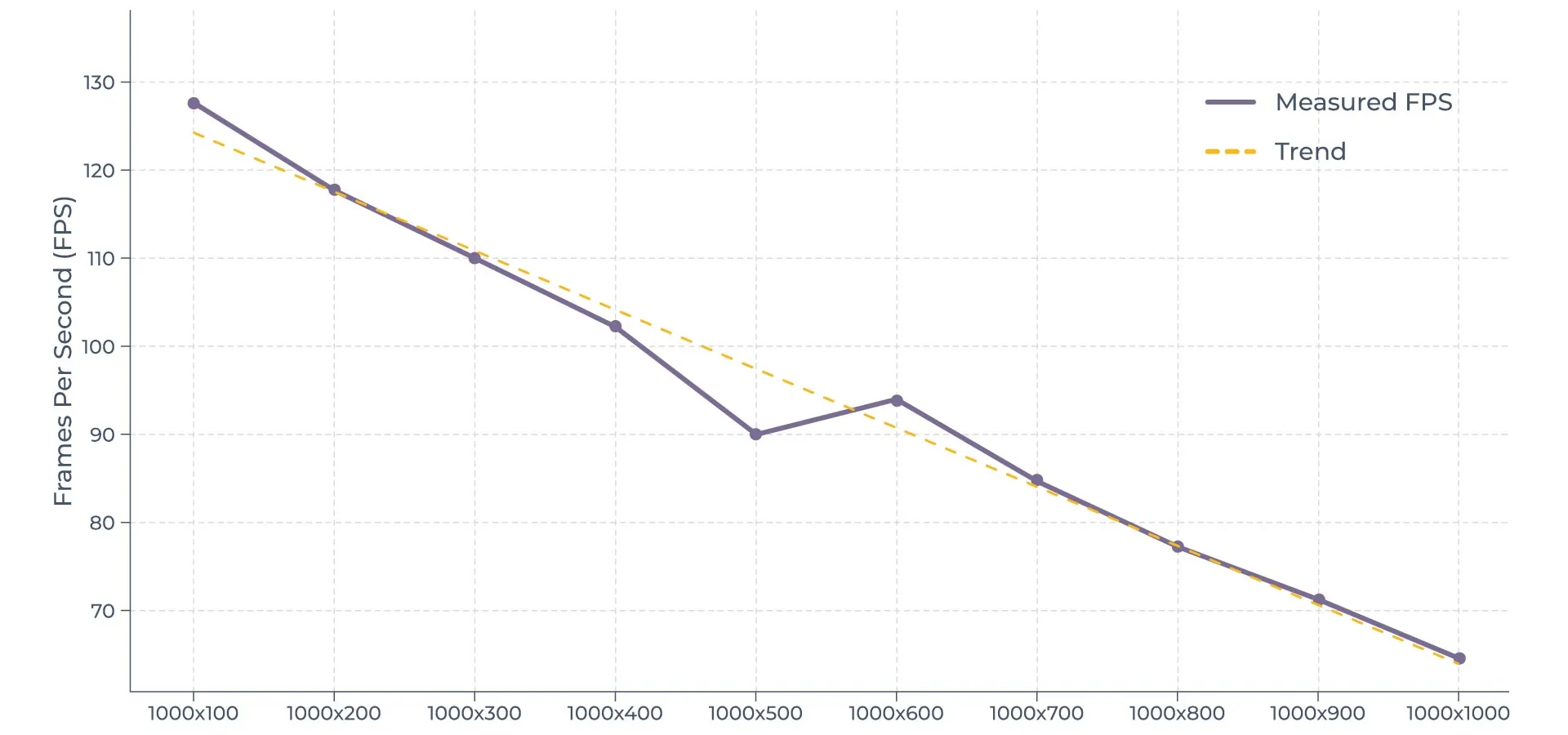
Figure 4. Performance tested
-
Table 1 summarizes the measurement results, while Figure 1 illustrates the performance trend across different buffer sizes. The results show a clear dependency between warping table size and performance.
Large tables (e.g., 1000×1000, ~1,000,000 points) achieved ~60 fps, reflecting heavier computational and memory loads. - Smaller tables (e.g., 200×100) reached over 120 fps, demonstrating that reducing mapping points directly improves throughput.
When using a fixed buffer size (1000×500) with increasing input image sizes, performance stabilized around ~85 fps, showing that beyond a certain point, internal engine constraints—not table size—become the limiting factor.
| Input image | Output image | Coordinate buffer | Total Output Pixels | Total Input Pixels | bpc | warping mode | performance |
|---|---|---|---|---|---|---|---|
| 2x2 | 1000x1000 | 1000x1000 | 1000000 | 4 | 16 | sample points | 60.2 |
| 2x2 | 1000x900 | 1000x900 | 900000 | 4 | 16 | sample points | 67.0 |
| 2x2 | 1000x800 | 1000x800 | 800000 | 4 | 16 | sample points | 69.3 |
| 2x2 | 1000x700 | 1000x700 | 700000 | 4 | 16 | sample points | 78.7 |
| 2x2 | 1000x600 | 1000x600 | 600000 | 4 | 16 | sample points | 89.6 |
| 2x2 | 1000x500 | 1000x500 | 500000 | 4 | 16 | sample points | 84.9 |
| 2x2 | 1000x400 | 1000x400 | 400000 | 4 | 16 | sample points | 99.6 |
| 2x2 | 1000x300 | 1000x300 | 300000 | 4 | 16 | sample points | 104.1 |
| 2x2 | 1000x200 | 1000x200 | 200000 | 4 | 16 | sample points | 112.5 |
| 2x2 | 1000x100 | 1000x100 | 100000 | 4 | 16 | sample points | 120.0 |
| 2x2 | 900x100 | 900x100 | 90000 | 4 | 16 | sample points | 120.7 |
| 2x2 | 800x100 | 800x100 | 80000 | 4 | 16 | sample points | 121.4 |
| 2x2 | 700x100 | 700x100 | 70000 | 4 | 16 | sample points | 122.4 |
| 2x2 | 600x100 | 600x100 | 60000 | 4 | 16 | sample points | 123.1 |
| 2x2 | 500x100 | 500x100 | 50000 | 4 | 16 | sample points | 123.9 |
| 2x2 | 400x100 | 400x100 | 40000 | 4 | 16 | sample points | 124.7 |
| 2x2 | 300x100 | 300x100 | 30000 | 4 | 16 | sample points | 125.6 |
| 2x2 | 200x100 | 200x100 | 20000 | 4 | 16 | sample points | 126.6 |
| 2x2 | 100x100 | 100x100 | 10000 | 4 | 16 | sample points | 127.4 |
| 100x100 | 1000x500 | 1000x500 | 500000 | 10000 | 16 | sample points | 85.05 |
| 200x100 | 1000x500 | 1000x500 | 500000 | 20000 | 16 | sample points | 85.15 |
| 300x100 | 1000x500 | 1000x500 | 500000 | 30000 | 16 | sample points | 84.95 |
| 400x100 | 1000x500 | 1000x500 | 500000 | 40000 | 16 | sample points | 85.05 |
| 500x100 | 1000x500 | 1000x500 | 500000 | 50000 | 16 | sample points | 85.15 |
| 500x200 | 1000x500 | 1000x500 | 500000 | 100000 | 16 | sample points | 85.05 |
| 500x300 | 1000x500 | 1000x500 | 500000 | 150000 | 16 | sample points | 85.15 |
| 500x400 | 1000x500 | 1000x500 | 500000 | 200000 | 16 | sample points | 85.05 |
| 500x500 | 1000x500 | 1000x500 | 500000 | 250000 | 16 | sample points | 85.15 |
Table 2. The measurements
Conclusion
The tests confirm that warping performance is strongly influenced by table size and resolution. Smaller coordinate buffer sets achieve higher frame rates, while overly dense grids provide little additional benefit. This underlines the importance of balancing accuracy and performance when configuring HUD warping tables on TRAVEO™ T2G devices.
If internal flash memory is insufficient for sample point mode, alternatives include delta vector or delta vector increments modes. Another option is to use the platform’s 512 MB of HyperFlash via the SMIF interface. However, both approaches may increase CPU load and reduce performance.
- When speed and precision are the priority: sample point mode is the best choice.
- When memory efficiency is more critical: delta vector or delta vector increments modes are preferable.